



I spent time using Vivaldi Browser as my everyday mobile browser, paying particular attention to how comfortably it supports different ways of reading, navigating, and getting things done. It is a free communication app from Vivaldi Technologies, available for everyone, and it takes a noticeably more configurable approach than the browser that usually comes preinstalled on a phone. I found that flexibility useful, although it also means there are more choices to understand before the browser feels completely natural.
At its best, Vivaldi is for people who want a browser that stays out of the way while giving them control over privacy, ads, tabs, and the general shape of the interface. Its store presence reflects that appeal: it has an average rating of 4.6 from around 132 thousand ratings, with more than 5 million installs. Those figures suggest a well-established audience, but they do not remove the need to decide whether its particular design suits your habits.
Reading, navigation, and the shape of the interface
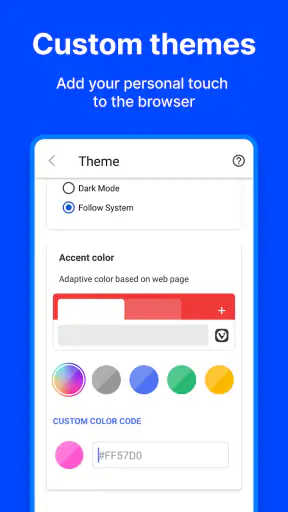
The first thing I noticed was that Vivaldi does not feel like a browser built around a single “search and forget” workflow. It gives more attention to navigation controls and personal arrangement, which can be helpful when I am moving between several pages rather than opening one quick search. I could make the browser feel closer to my preferred hand position instead of accepting the layout chosen by a simpler browser.
That matters for readability because a browser is not only a window for web pages. The address field, back and forward controls, tab access, menus, and page actions all affect how much effort a person spends before reaching the content. When those controls are placed where I expect them, I make fewer repeated movements and lose less concentration. Vivaldi’s configurable approach is therefore more than decoration; it can reduce friction for people who have a strong preference for where controls sit.
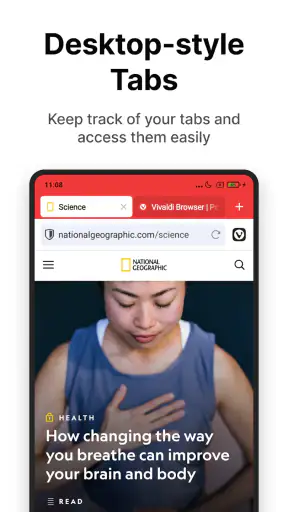
I also liked the sense that the browser is designed for people who want to manage browsing rather than merely pass through it. Someone researching a purchase, comparing travel information, or checking several sources for work can benefit from a browser that treats open pages as something to organize. The trade-off is that a person who wants the most stripped-down possible interface may find the extra options unnecessary. The same flexibility that helps one user can make another user pause and wonder which setting is actually worth changing.
For reading, the most important practical habit is to adjust the browser gradually. I would not change every available preference at once. I would first place the main controls where they are easiest to reach, then use the browser for a day before deciding whether more changes are needed. This makes it easier to tell whether a problem comes from the website itself or from the browser layout.
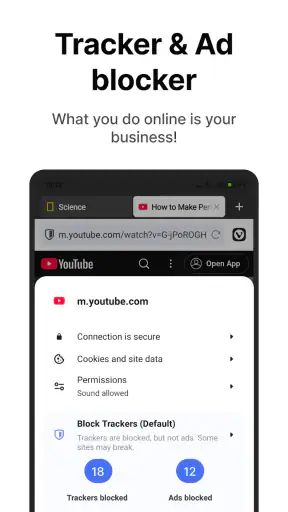
Vivaldi’s privacy-first position also affects the reading experience. Its built-in ad-blocking tools can make pages feel less crowded when they work as expected, and blocking trackers can reduce the number of distracting elements following a browsing session. In my experience, cleaner pages are particularly useful when I am reading on a small screen or trying to maintain focus. Still, web pages are inconsistent, so a blocked element can occasionally affect how a site behaves. I prefer having the ability to adjust protection for a troublesome page rather than abandoning the browser immediately.
Why its controls can help different reading styles
People who read in short bursts may appreciate being able to keep their browsing tools close at hand. I often use a phone one-handed while standing or waiting, and a familiar control position makes those brief sessions less tiring. Someone with reduced dexterity may also benefit from avoiding unnecessary trips across the screen, although the usefulness depends on the person’s preferred grip and the phone’s size.
For users who rely on the operating system’s text scaling, display settings, or spoken feedback, the important question is whether the browser remains understandable when the system presentation changes. Vivaldi does not replace those platform tools; it sits inside them. I would test it with the exact text size, contrast preference, and screen reader settings used elsewhere on the phone. A layout that feels clear at the default size may become more crowded after enlargement, especially around compact browser controls.
This is one area where I would avoid assuming that a customizable interface automatically solves every accessibility need. Customization can improve reach and recognition, but it can also introduce unfamiliarity. If several people share a device, a heavily personalized arrangement may be confusing for someone who expects standard browser controls. I would keep the setup simple enough that another person could still understand the basic navigation.
Motor effort, touch accuracy, and sensory comfort
Touch interaction is where Vivaldi’s design becomes most personal. A user who can make accurate taps may enjoy having more browser functions available without digging through several screens. A user with tremors, limited reach, or difficulty making small gestures may prefer a layout with fewer visible actions and a predictable route to the back button, tabs, and menu. The right arrangement is not the one with the most controls; it is the one that reduces mistaken taps.
I found it useful to distinguish between frequent actions and occasional actions. Search, back navigation, and tab switching deserve the easiest positions. Less common tools can stay inside a menu. This simple division makes the interface calmer and prevents a screen full of options from competing with the page I am reading. It is also a good way to make the browser easier for a family member who is not interested in learning every feature.
For sensory comfort, the built-in ad and tracker blocking can be meaningful. Pages with fewer animated promotions and intrusive advertising often feel easier to scan, particularly for someone sensitive to visual clutter. It can also help when a page contains several competing calls to action. However, blocking is not the same as controlling every visual issue on the web. A site may still use bright colors, motion, dense layouts, or poorly chosen typography, and the browser cannot redesign all of that reliably.
Sound is another consideration. A browser session may involve videos, advertisements, or pages that begin playing media, depending on the site. I would use the phone’s own volume, mute, and media controls alongside Vivaldi rather than expecting the browser alone to manage every sensory interruption. That approach is more dependable when moving between apps or using the phone in a quiet public place.
People who are easily distracted may find the privacy and blocking features valuable because they remove some of the visual noise that turns a short task into a long one. I noticed this when checking a page for one specific detail: a cleaner page made it easier to find the relevant paragraph and leave. On the other hand, people who depend on advertising-supported sites or who need every embedded element to load exactly as designed may prefer a browser with less intervention by default.
Using it in real situations
A realistic example is checking a train itinerary while carrying a bag. I would rather open the page, read the departure information, and switch back to a message without fighting pop-ups or losing the page among unrelated tabs. Vivaldi’s focus on control and reduced tracking fits that kind of short, practical session. If I need to compare the itinerary with a map and a message thread, the browser’s more organized approach becomes more useful than a minimal browser that treats each page as a separate, disposable visit.
Another situation is browsing in a crowded café with a weak attention span after a long day. I may be reading an article, checking a product page, and looking up a definition. A less cluttered page helps me maintain the thread of what I am doing. Privacy controls also feel more appropriate on shared or public networks, although no browser should be treated as a guarantee that every online activity is completely risk-free.
Vivaldi is also a reasonable choice for people who move between personal and practical browsing. I can use it for communication-related tasks, research, forms, and ordinary web reading without installing a separate app for each kind of page. Its category is Communication, but in daily use it functions as a general gateway to online services rather than a messaging tool itself.
For someone using assistive technology, I would make the decision through a short trial rather than relying on general claims. Open the sites used most often, enlarge text to the preferred level, try spoken navigation if needed, and check whether tab switching and menus remain manageable. This test reveals more than a broad promise of accessibility because websites, phones, and individual needs vary so widely.
Where it differs from familiar alternatives
The usual alternative is the browser already installed on the phone. That option often wins through familiarity, account integration, and a very short learning curve. If I want automatic continuity with an existing device ecosystem and do not care about changing the layout or blocking more page elements, the default browser may be the easier choice.
Vivaldi makes more sense when I value control over convenience. Its private, ad-blocking approach can create a calmer browsing environment, while its configurable navigation gives me more say in how the browser behaves. The cost is mental overhead: I have more decisions to make, and some sites may need occasional adjustment when blocking affects a page.
Compared with privacy-focused browsers that keep their interface extremely restrained, Vivaldi feels more willing to expose customization. That is an advantage for a person who wants to tune the experience, but not necessarily for someone who finds settings tiring. I would choose the simpler alternative for a relative who wants only a large address bar and dependable basic navigation. I would choose Vivaldi for myself when I want privacy tools and a browser that can adapt to my habits.
It is also worth separating privacy from anonymity. Vivaldi’s no-tracking and blocking focus can reduce unwanted observation and clutter during ordinary browsing, but it does not make a person invisible online. Users still need sensible account security, careful handling of personal information, and awareness of what they choose to visit or submit. That distinction is important for anyone selecting a browser because of privacy concerns.
Small habits that make the experience easier
My first recommendation is to set up the browser in a quiet moment, not while trying to complete an urgent task. Decide which actions need to be reachable with one hand and leave the rest alone. This avoids turning customization into another obstacle.
My second recommendation is to treat blocking as a tool rather than a rigid rule. If a trusted site displays incorrectly, temporarily adjust the protection for that page and check whether the problem is resolved. If the page becomes noisy again, I can decide whether the content is worth the compromise. This is more practical than assuming every broken page proves the browser is unsuitable.
My third recommendation is to test the browser with the pages that matter most. A person who reads long articles should test long articles. Someone who fills in online forms should test forms. Someone who uses video or web-based communication should test those services. The browser’s real value appears in these repeated workflows, not in a single five-minute search.
I would also keep the interface recognizable if the phone is shared. Personalization should reduce effort, not create a private puzzle. A restrained arrangement with clear controls is often more inclusive than an elaborate one, especially when another person may need to use the device in a hurry.
Limitations I would consider before switching
Vivaldi is not automatically the best fit for every phone user. Its strength is choice, and choice can feel like work. People who dislike adjusting software may prefer the predictable behavior of the default browser. Those who depend on exact compatibility with a particular website should test that service before making a permanent switch, especially if it relies on advertising, embedded media, or unusual page scripts.
There is also a practical learning period. Even when the basic browsing actions are familiar, the browser’s broader approach invites exploration. That can be enjoyable for an experienced user, but it may be frustrating for someone who needs immediate simplicity. I would not recommend changing browsers right before travel, an exam, or an important appointment; the small differences in menus and tab handling are enough to slow down a rushed task.
Users with specific accessibility requirements should judge the complete combination of phone, operating system settings, assistive tools, and websites. Vivaldi may fit well into that setup, but the result depends on how those parts interact. I would pay special attention to focus order, touch target comfort, text enlargement, and whether privacy blocking changes the page structure. These are practical checks, not assumptions based on the app’s general positioning.
The current version is 8.1.4099.138, and the app requires at least Android 10. That makes the operating system requirement an important first check for anyone using an older device. The app itself is free, and its content rating is Everyone, so the main decision is less about cost or age suitability and more about interface preference, compatibility, and the level of control the user wants.
An inclusive verdict for everyday browsing
After using it as a regular browser, I see Vivaldi as a strong option for people who want a quieter, more private, and more adjustable way to use the web. Its usefulness for different abilities comes from practical control: arranging navigation around a preferred grip, reducing visual clutter, and choosing how much browser complexity to keep visible. Those advantages are real, but they work best when the user is willing to spend a little time shaping the experience.
I would recommend it to readers who are frustrated by crowded pages, unwanted tracking, or browser controls that do not suit the way they hold their phone. I would also recommend it to people who often compare several pages and want more deliberate navigation. The free price makes trying it low-risk, and the broad Everyone rating makes it suitable for general household use.
I would steer a person toward the usual default browser instead if they value automatic familiarity above all else, need a very minimal interface, or rely on a website that behaves unpredictably when blocking tools are active. For users with specific motor, visual, or sensory needs, I would install it only after testing their actual settings and most-used sites.
My final impression is that Vivaldi does not solve every barrier, but it gives users more useful levers than a basic browser. Its best accessibility advantage is the ability to reduce unnecessary effort without forcing one fixed browsing style. That makes it a thoughtful choice for everyday communication and web tasks, provided you approach customization as a personal setup process rather than expecting the default arrangement to suit everyone immediately.


